Gdb patches

Here you have the patches I did for gdb:

  • To fix problem with gdbinit
  • To display raw bytes in x/i and disassemble commands
  • To warn about possible number of sections anti-debug trick

You can download a single patch for all changes or one for each individual change. A patched gdb binary for Intel only is available, if you trust my binaries (copy to /usr/libexec/gdb). PHP max upload size doesn’t let me add the patched source package (can’t change it due to it’s impact on others).

I have removed symbolic name printing from the x/i command because I couldn’t find an easy workaround to have all the output aligned. Gdb table system has problems and it doesn’t work well with large columns. Nevertheless the symbolic name (when available) is printed everytime breakpoint is hit and if you really need it, you can use the disassemble command to see where you are (not removed there).

The anti-debug patch just warns about the possible trick. Unless dyld bug is fixed there’s no much interest in automatically fixing the headers. If you want to test it, you can use HT Editor (hte.sourceforge.net) to easily modify the nsects. Keep in mind that HTE only supports non-fat binaries!

This is how it looks:
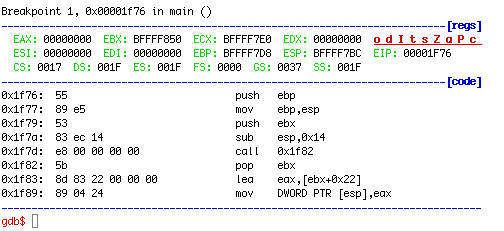
gdbscreenshot

Have fun,
fG!

Files:
all_patches.patch SHA1(all_patches.patch)= 74ee59cc213202d2d99c11ca8cde841890a7c7b6
number_sects_anti_debug.patch SHA1(number_sects_anti_debug.patch)= 628498adc71b91447ba8860cec3829acf0eb7f46
gdbinit_problem.patch SHA1(gdbinit_problem.patch)= efd8ab19d2675d601f02aa7f3b7ca21a9bee7704
show_raw_bytes.patch SHA1(show_raw_bytes.patch)= 6ba57a401c1d3c0f6d7b31743da79ec63603752e
gdb-i386-apple-darwin.bz2 SHA1(gdb-i386-apple-darwin.bz2)= 4ce058eb26639bba0ab9974ace27adeeef446905

If you put the patch inside gdb-768 dir you might want to use -p2 option for patch (the diffs came out of my hg repository).

  1. wishi’s avatar

    Hi ;)

    You’ve got a very interesting blog. Especially optimizing the Apple Dev Tools to be more reversing friendly is a kewl project. However I gave this a try and it doesn’t work:

    gdb$ r
    Unable to find Mach task port for process-id 70506: (os/kern) failure (0×5).
    gdb$ quit

    Even if:

    wishi@dawn ~/patched
    % sudo chgrp procmod gdb-i386-apple-darwin

    wishi@dawn ~/patched
    % sudo chmod 2755 gdb-i386-apple-darwin

    You don’t get it working. Maybe I miss something crucial?

    Reply

    1. fG!’s avatar

      Hello,

      Thank you for the compliment :) Are you using the binary I provided or compiled it yourself (knowing your blog I would bet on this hehehe) ? I had that same error when I compiled gdb from Apple package out of the source. To compile correctly you need to refer to this process http://reverse.put.as/2009/01/14/how-to-compile-gdb-and-other-apple-open-source-packages-in-mac-os-x/ . You have to use darwinbuild. If you I can upload my image with my building environment.

      Keep up the good work with your blog :)

      fG!

      Reply

  2. wishi’s avatar

    I guess I compile that stuff… because for testing reasons I used your binary. Debugging a Debugger: sounds like fun! ;)

    Reply

  3. anonym’s avatar

    I got the same err on test using your binary:
    “Unable to find Mach task port for process-id 70506: (os/kern) failure (0×5).”
    whatever i will use your patch and compile it later…

    You have a very nice and informative blog!
    i know you from the windows world for over 5 years ago.
    i am a still reader, but i come twice time almost every day here.
    please add the link to wishi’s blog in your “Links” collection. (very nice blog too, wishi!)

    Thank you and keep update! :D

    Reply

  4. fG!’s avatar

    I had some free time but I can’t reproduce the bug… I tested with a clean vmware snapshot and replaced original gdb binary with this one and it works… Tried to attach to a running program and it was fine. Tried to run a new program and it was fine… Hummm something is missing ! My Xcode version is 3.1.

    Any ideas ? Must find some more free time to try to reproduce this hehehe

    Reply

  5. wishi’s avatar

    I missed something… I didn’t copy the binary to /usr/libexec/gdb/ but just called it directly.
    - Debugging as root was/is possible without problems: task_for_pid() by default is only accessible by root (or procmod) (http://developer.apple.com/legacy/mac/library/documentation/MacOSX/Conceptual/universal_binary/universal_binary_tips/universal_binary_tips.html).

    However I wonder why the binary has to be in a specific path… Anyhow.

    Sorry ;) But I learned something.

    Reply

    1. fG!’s avatar

      Ahhhhhhhhhhhhhhhhh ! That explains… I tried to understand if you had copied it or not. I assumed you did because you tried to change permissions (which now seems like a rather lame assumption since I should have remembered that copy preserves permissions hehehe).

      You have to copy the binary because gdb command in reality is a script at /usr/bin/gdb. It does some magic due to different architectures :)

      Reply

  6. x_O’s avatar

    I backed up the original gdb-i386-apple-darwin to gdb-i386-apple-darwin.orig and copied your patched version to /usr/libexec/gdb/. I load a file in GDB using exec-file and upon executing the “run” command, I too receive the error: “Unable to find Mach task port for process-id 70506: (os/kern) failure (0×5).” The only way I’ve found to get rid of the error is to issue “sudo gdb” instead of just “gdb”. Is there a way to I could run GDB without having to issue the sudo command (to circumvent that error)? I’m running as an Admin account and the file permissions on gdb-i386-apple-darwin (patched version) are the same as the original I backed up.

    Reply

    1. fG!’s avatar

      $ ls -la /usr/libexec/gdb/gdb-i386-apple-darwin
      -rwxr-sr-x 1 root procmod 3051328 Aug 26 23:31 /usr/libexec/gdb/gdb-i386-apple-darwin

      Do you have the s bit set and group procmod ?

      Reply

  7. x_O’s avatar

    Nope. That was it. It’s all working now. Thanks fG!

    Reply

  8. Dave’s avatar

    Did you file a radar about this? It’s possible that Apple would fix these bugs.

    Reply

  9. Dave’s avatar

    Also what about patches for Snow Leopard / 64-bit? :)

    Reply

    1. fG!’s avatar

      The patches work for Snow Leopard without a problem. Someone already left all the required steps to compile it for Snow Leopard :)

      Reply

  10. NeoBetas’s avatar

    Is there anyways to modified .gdb_init to show the raw bytes instead patching and recompiling?

    Reply

    1. fG!’s avatar

      Nope. You have to patch and recompile.

      Reply